Repair ticket software for phone repair shops that keeps the queue, bench, and pickup aligned
Use one repair record to manage intake detail, technician updates, approvals, parts, and pickup billing without rebuilding the job at the counter.
See how repair tickets actually work before you sign up
Go straight into a real repair workflow and see intake, updates, parts, and pickup in one system.
What is repair ticket software?
Repair ticket software is the operating system a phone repair shop uses once repairs outgrow paper notes, chat threads, and spreadsheet follow-up. Instead of treating the queue, technician notes, approvals, parts, and pickup as separate steps, one ticket keeps the repair visible for the whole team.
- Customer details stay attached to the repair ticket from drop-off to pickup
- Device details make it clear which phone, issue, and condition the team is working on
- Status updates show whether the repair is waiting, in diagnosis, in repair, or ready
- Parts used on the job stay tied to the same repair ticket instead of separate notes
- Ticket history shows what changed during the repair and what was completed
Why phone shops start looking for repair ticket software
Phone shops usually start looking for repair ticket software after the queue becomes unreliable. Front desk cannot tell what is actually waiting on parts, technicians get interrupted for status checks, added work or approvals drift outside the record, and pickup gets messy because nobody can see the full repair without checking multiple places.
FixFlowSoftware keeps the repair ticket central from drop-off to payment. For independent phone shops and small teams, that means front desk, technicians, and pickup staff can all work from the same live job record instead of rebuilding context from paper, chat, spreadsheets, or a generic POS. If the main buying concern is faster check-in, use the repair intake software for phone shops page first. If the next question is how the shop should decide between full intake and quick intake, the repair shop intake process page covers that workflow decision.
What staff can actually see inside the repair ticket
A useful repair ticket has to answer real shop questions quickly: what came in, what was approved, what was added during the repair, and what front desk can confirm when the customer comes back.
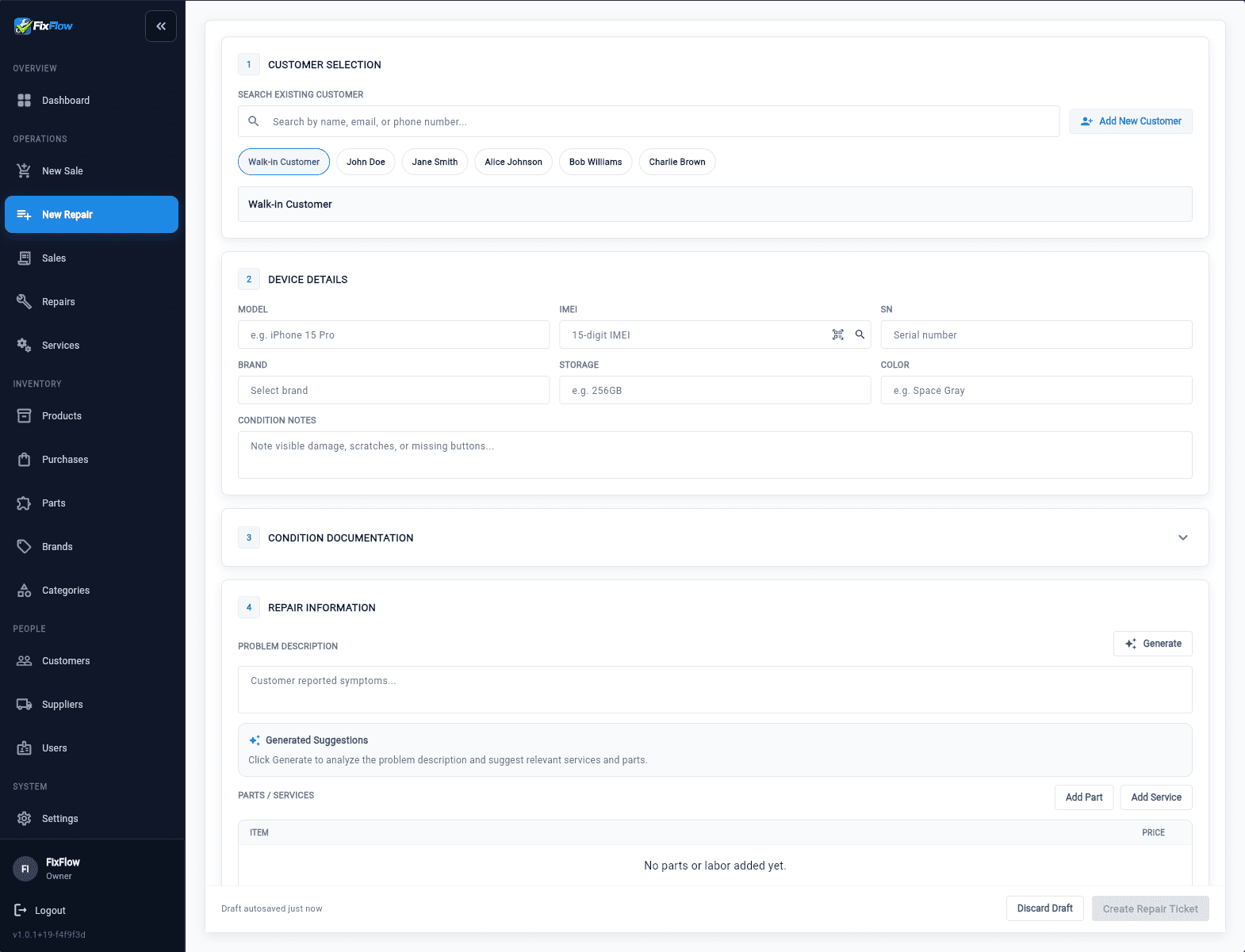
Intake starts with the details front desk needs before the job moves
The intake screen captures customer selection, device details, condition notes, issue description, estimate context, and selected services or parts before the technician starts work, so the bench starts with cleaner context instead of callbacks to the counter.
- Customer, device, and issue detail stay attached from the first step, which reduces front-desk rework and speeds technician start time
- Condition notes and estimate context make it easier to answer disputes and callback questions after drop-off
- Selected services and parts start inside the same ticket, which helps recover billable work instead of rebuilding charges later
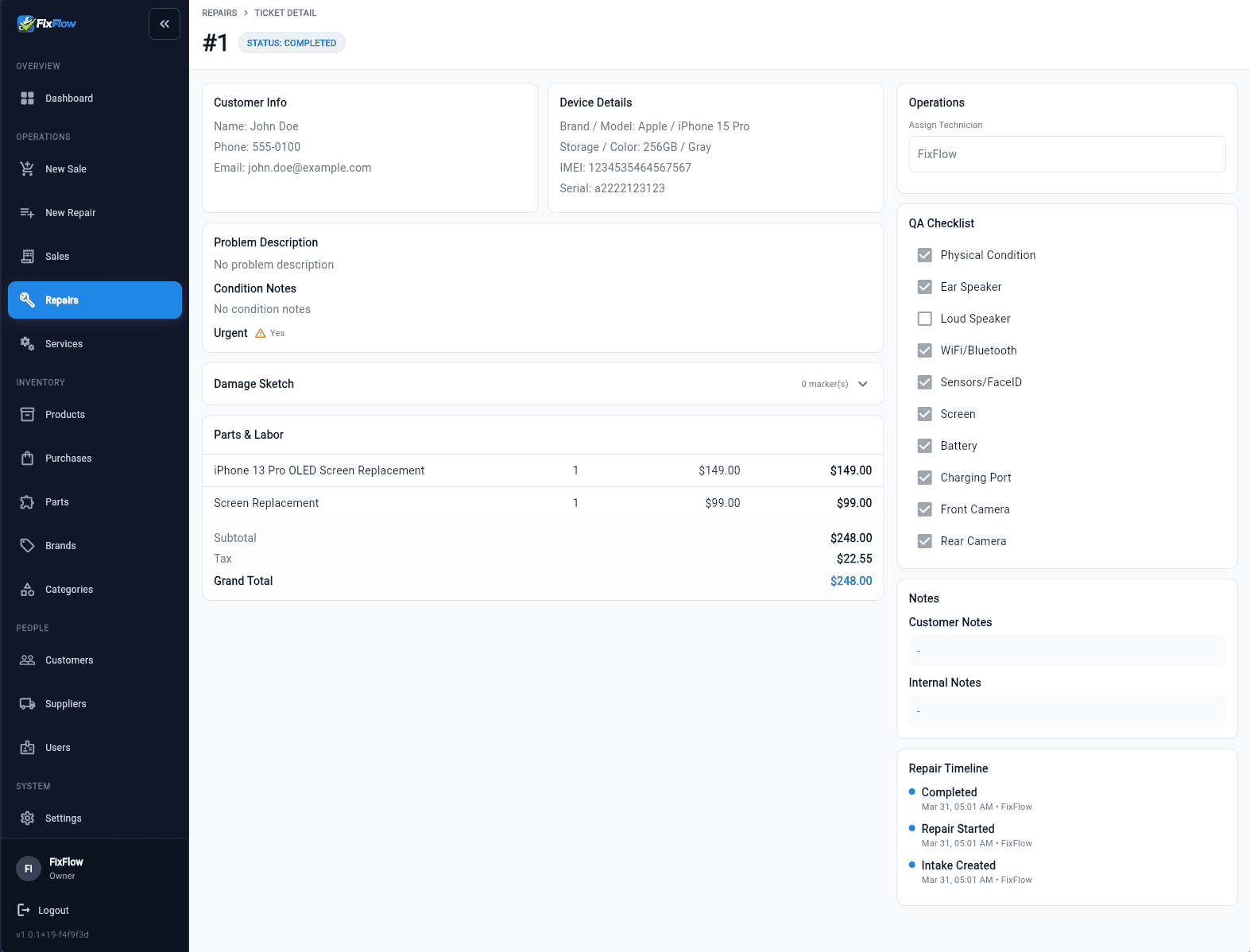
Completion keeps totals, notes, and history visible at pickup
The completed repair view lets staff review customer and device info, QA checklist context, parts and labor totals, notes, and timeline history before pickup so the counter can answer questions without rebuilding the job.
- Timeline history and notes keep the repair trail visible, which shortens pickup conversations and follow-up calls
- Parts and labor totals stay visible inside the repair record, which reduces missed billing and counter-side reconstruction
- QA context, notes, and customer/device detail stay together, which gives staff cleaner dispute handling when something is questioned later
Why shops trust the repair record at pickup
The strongest trust signal on a repair ticket is not a slogan. It is whether staff can confirm what was approved, what changed, and what is billable while the customer is standing at the counter.
Signed approval stays attached
Approval and signature context stay with the repair ticket, so staff can confirm what was agreed before disputes turn into guesswork.
Condition notes reduce drop-off disputes
Condition notes and damage context recorded at intake give the shop a clearer record of what the device looked like before work started.
Timeline history keeps added work visible
Status updates, notes, and added-work context remain on the same job trail, which makes technician handoffs and customer answers faster.
QA and totals stay ready for pickup
QA context plus parts and labor totals remain visible on the completed ticket, so pickup is cleaner and billable detail is easier to recover.
How the repair ticket works across front desk, technician, and pickup
The value is not just that the ticket exists. It is that each role can update and read the same job without losing billable detail or stopping to ask what changed.
Step 1
Front desk captures enough detail to prevent rework at the bench
Customer details, device details, condition notes, issue description, estimate context, and approval/signature context are captured before work starts so the technician is not chasing missing context later. The [how to speed up repair intake](/guides/how-to-speed-up-repair-intake) guide is useful when the shop needs that same starting quality with less counter friction.
Step 2
Technicians update the live job instead of separate notes
Diagnosis notes, selected services, parts usage, and status changes stay tied to the same repair ticket while the job is active, which helps prevent missed charges and status confusion.
Step 3
Ready-for-pickup becomes a visible state instead of a verbal update
Front desk can see whether the job is waiting on parts, in progress, or ready for pickup without stopping a technician for the latest answer.
Step 4
Pickup staff can review the full job without reconstructing it
When the customer returns, front desk can review notes, QA context, parts and labor totals, and timeline history from the same ticket instead of rebuilding the repair from memory or multiple screens.
See how a repair ticket actually works
Open the live demo and see how repair ticket software handles queue control, technician updates, approvals, parts, and pickup in one place. Then review the intake-focused repair intake software for phone shops page if counter speed is the buying problem, the repair shop intake process if you need intake rules, and the repair ticket workflow guide to tighten the full ticket-first flow.
Repair-ticket-first workflow vs paper, chat, and spreadsheet-plus-POS stacks
Most small shops do not compare FixFlowSoftware against nothing. They compare it against a patchwork of paper tickets, chat updates, spreadsheets, and a separate POS. That stack is where repair detail usually gets lost.
| Feature | Paper + chat + split-tool workflow | FixFlowSoftware repair ticket workflow |
|---|---|---|
| Intake detail | Customer, device, and issue detail gets split across forms, memory, or follow-up questions, which slows intake and creates rework | One repair ticket holds intake detail from the first step so the job starts faster and technicians get cleaner context |
| Approval and dispute trail | Approval context gets lost after drop-off, so disputes are harder to untangle later | Approval and signature context stay tied to the repair ticket so staff can defend what was agreed |
| Technician handoff | Bench staff gets interrupted for the latest context and still risks missing important notes | Notes, status, and added work stay on the same job record so handoffs are faster and interruptions drop |
| Parts and labor billing | Used parts and extra labor get added later or missed entirely, which leaks revenue | Service and parts lines stay tied to the ticket while work happens so the final charge is easier to recover cleanly |
| Pickup and payment | Front desk rebuilds job context from multiple tools while customers wait for answers | Pickup and payment stay tied to the completed repair record so staff can answer faster and close the job with less confusion |
Phone shops feel the pain long before checkout: repeated status questions interrupt the bench, approval gaps create dispute risk, added work gets missed, and pickup slows down when the counter has to reconstruct the story. That is why a repair-ticket-first workflow is a better fit than a generic POS-first stack when repairs drive the business.
Who this repair ticket workflow is built for
This is strongest when the repair ticket needs to drive daily operations, not sit beside a generic checkout flow.
Best for independent phone shops and small teams
A strong fit for owner-led stores and lean teams that need one repair record staff can trust during intake, bench work, and pickup without extra admin layers.
Best when repairs drive the daily workflow
If most counter pressure comes from active repairs, status questions, and pickup handoff, this workflow matches the actual work better than retail-first software.
Stronger than generic POS-first setups
Generic POS can complete payment, but repair shops also need approval context, parts usage, QA notes, and history to stay attached before the customer reaches the counter.
Less suited for retail-only counters
If the shop is mostly accessory checkout with very light repair tracking, this will feel more structured than the counter needs, which is exactly why it works best for repair-heavy stores.
Related workflows
Repair intake software for phone shops
Use the intake-specific commercial page when the software buying question is how to fix slow or inconsistent check-in.
Repair shop intake process
See when full intake versus quick intake makes more sense in a real repair workflow.
How to speed up repair intake
Reduce check-in time without weakening the repair record that the bench and pickup staff still need later.
Repair ticket workflow for phone shops
Follow the intake-to-pickup sequence that keeps the ticket readable for the whole team.
Repair ticket workflow management feature
See the route focused on the ticket-management feature set inside the same cluster.
FixFlowSoftware pricing for repair shops
Review repair shop software pricing after you validate the ticket-first workflow.
Frequently Asked Questions
What is repair ticket software for phone shops?
It is software that lets a phone repair shop run each repair from intake to completion inside one job record. Instead of splitting customer details, status updates, parts usage, notes, and pickup history across different tools, the shop works from one repair ticket throughout the job.
Why do phone repair shops lose track of tickets?
Most shops lose track of tickets when intake, technician updates, and pickup details get split across paper, chat, spreadsheets, and separate checkout tools. That creates repeated status interruptions, missing context, and more work at pickup when staff has to rebuild what happened.
Can repair ticket software help with parts and labor billing?
Yes. When parts and service lines are recorded inside the same repair ticket while the job is being worked, staff is less likely to forget billable items at pickup. That matters most in busy shops where labor notes, parts usage, and final payment often get split across different tools.
What should a phone repair ticket include?
A strong repair ticket should include customer and device details, intake condition notes, issue description, selected services or parts, approval context, technician notes, status history, and completion or pickup records. In practice, that gives staff one place to confirm what came in, what changed during the job, what was approved, and what the customer should be paying for when questions come up at pickup.
Does this replace the pickup checkout step?
It connects directly to the pickup step rather than replacing the need to collect payment. The benefit is that front desk can review the completed repair, parts and labor totals, notes, QA context, and history from the same record when the customer arrives, instead of rebuilding the job from memory or multiple screens during a dispute or a busy pickup rush.
Is this built for large chains or small phone shops?
It is built first for independent stores and small teams that need a reliable repair record at the counter without adding enterprise-style process overhead. If your operation depends more on large multi-location controls than on day-to-day repair handoffs, this page is describing the smaller-shop use case more directly.