Repair ticket workflow management that proves intake detail survives the whole repair
Use this feature page to verify that customer detail, condition notes, approvals, technician updates, and pickup context stay visible on one repair record from check-in to closeout.
Test the repair-ticket flow before you commit to it
Go straight into the live workflow and check whether intake detail, updates, approvals, and pickup context stay on one record.
What this repair-ticket feature page should prove
A repair-ticket feature is useful only if it keeps the full repair story readable after intake. That means the counter should be able to create the record once, technicians should be able to work from it directly, and pickup staff should still trust it hours or days later.
If your team is still fixing weak check-in first, compare this page with the repair intake software for phone shops route and the repair shop intake process guide. Those pages explain what should enter the record before this feature page asks you to trust the rest of the workflow.
Where the workflow continuity becomes visible
The feature has to prove that the intake record stays readable after the phone leaves the counter and before the customer comes back.
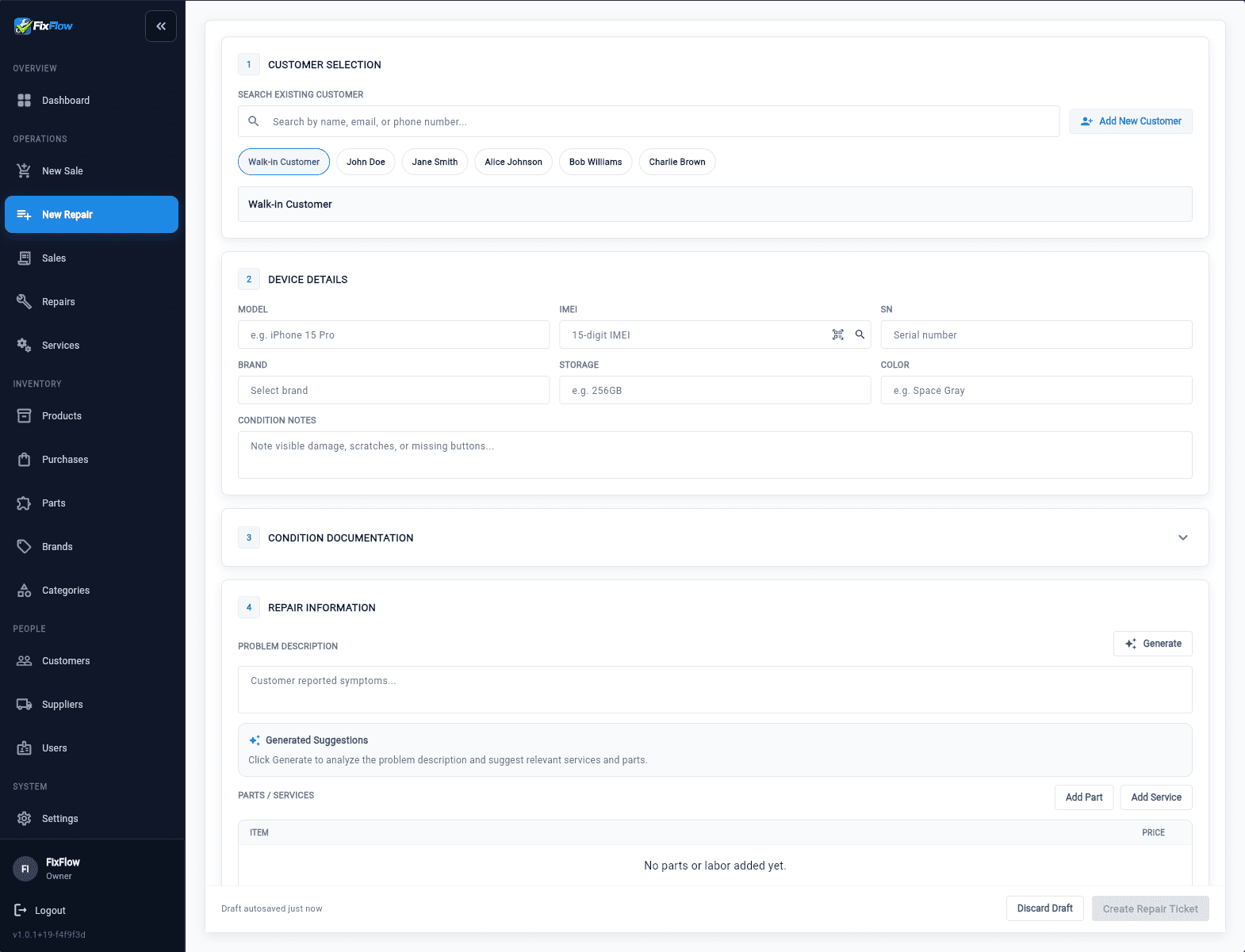
The intake view should give the bench a usable starting record
Customer detail, device information, condition notes, issue context, estimate logic, and selected work should already be attached before diagnosis starts. If your shop is still deciding how much detail belongs here, the [how to speed up repair intake](/guides/how-to-speed-up-repair-intake) guide and the [customer approval workflow for phone repair](/guides/customer-approval-workflow-phone-repair) guide cover the two most common weak spots.
- Shows whether intake detail survives the handoff into technician work
- Shows whether approvals and notes remain visible instead of becoming side conversations
- Shows whether services and parts start on the same record instead of being rebuilt later
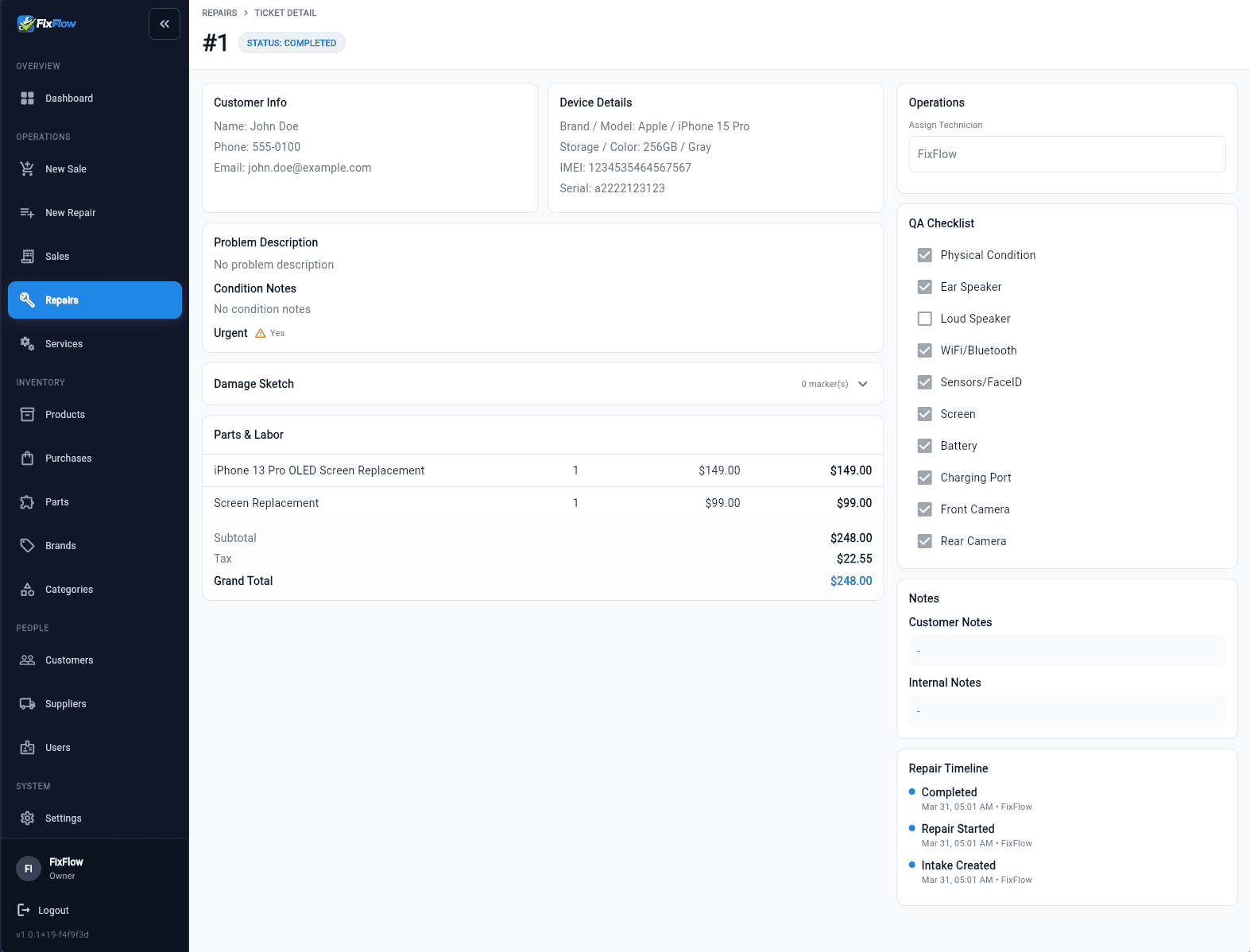
The completed view should still answer pickup questions quickly
The final record should keep totals, notes, QA context, and timeline history visible enough that front desk can close the repair without reconstructing the job.
- Confirms that status changes and notes remain attached through the whole lifecycle
- Confirms that billable detail stays visible at closeout
- Confirms that the same repair record remains useful at pickup, not only at intake
How to evaluate the repair-ticket feature in daily use
The right test is not whether the screen looks complete. It is whether the queue becomes easier to trust under pressure.
Step 1
Start with intake continuity
Use the [repair shop intake process](/repair-shop-intake-process) as the workflow standard, then confirm this feature keeps that intake visible after the device leaves the counter.
Step 2
Check technician readability
The feature should make issue notes, approval logic, and next actions easy for technicians to understand without a second round of questions.
Step 3
Check manager visibility
If the queue depends on verbal updates, this feature is still too weak. The ticket should make statuses, blockers, and ownership visible enough for queue review.
Step 4
Check pickup continuity
The completed record should already contain the notes, totals, and history needed to answer customer questions at closeout.
The checkpoints that matter most
These are the operational checks that separate a real repair-first feature from a generic ticket screen.
Intake detail stays visible
The feature should keep the same device, issue, and condition context readable after the first handoff.
Approval context does not disappear
Estimate and authorization detail should remain attached through updates, not just during intake.
Status changes explain the queue
A good feature makes it obvious whether the job is in diagnosis, waiting on parts, waiting on approval, or ready for pickup.
Pickup closes from the same record
The counter should be able to review notes, totals, and history without rebuilding the repair from memory.
Where this page fits in the ticket-management cluster
This page is the workflow-proof layer inside the cluster. The broader repair ticket software for phone shops page covers the full commercial case, while the repair intake software for phone shops page narrows in on fast check-in as the main buying concern.
If the workflow proof looks right here, the next step is to compare the broader repair ticket management software positioning and then review FixFlowSoftware pricing for repair shops only after the intake and handoff model already fits the way your team works.
Test the workflow, then move into the broader ticket page
Use the live demo to judge whether the record stays readable from intake to pickup. Then review the broader repair ticket software for phone shops page and the intake-specific repair intake software for phone shops page to compare fit.
Related workflows
Repair ticket software for phone shops
Use the commercial pillar for the ticket-first workflow and product positioning.
Repair intake software for phone shops
Use the intake-specific commercial page when the main buying problem starts at check-in speed and intake quality.
Repair shop intake process
Use the intake guide to decide when quick intake versus full intake should feed this workflow.
How to speed up repair intake
Reduce counter time without weakening the record this feature still has to carry later.
Repair shop software pricing
Review current FixFlowSoftware pricing after you validate the repair ticket workflow.
Frequently Asked Questions
What should a repair-ticket feature prove in a demo?
It should prove that intake detail, status updates, technician notes, approvals, and pickup context stay on one readable record instead of splitting across separate tools or screens.
How is this different from the repair-ticket software page?
This feature page is the workflow-proof layer. The repair-ticket software page is the broader commercial view of why a phone shop would buy a ticket-first system.
Why does intake matter on a repair-ticket feature page?
Because the feature is only as strong as the record it starts with. If weak intake creates thin tickets, the rest of the workflow becomes harder to trust no matter how good the later screens look.