Repair Shop Inventory Management Software
Repair shop inventory software that keeps parts connected to the repair
Most inventory tools track stock on their own.
FixFlow keeps parts tied to the repair ticket, so your team can see what was used, what is left, and what to reorder.
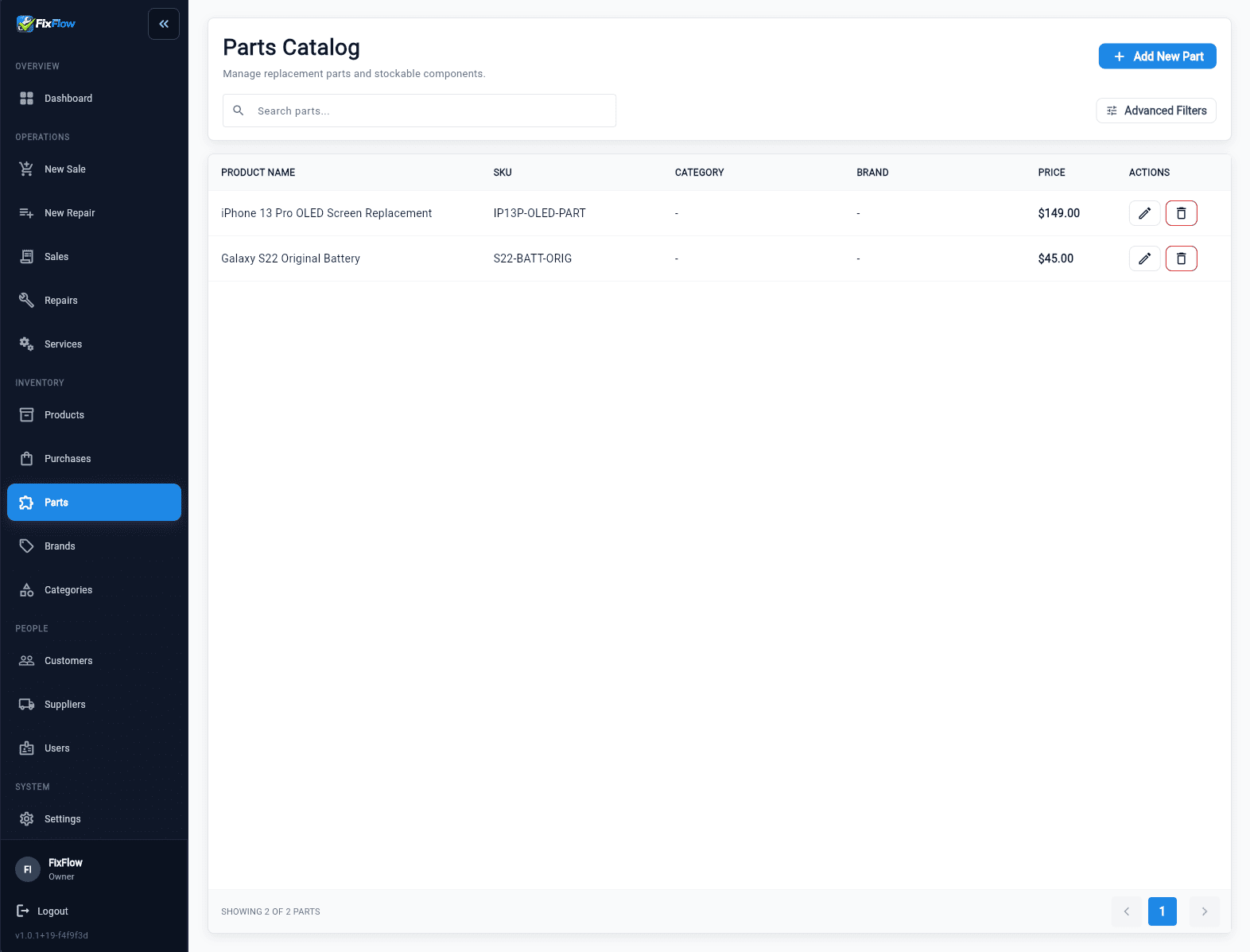
What you get
Parts stay linked to repair tickets
Inventory updates automatically when parts are used in a job.
Stock levels stay accurate without manual tracking
No need to update spreadsheets after each repair.
Clear view of what is available and what is low
Avoid delays caused by missing parts.
Less guesswork when ordering parts
See real usage instead of rough estimates.
Why inventory breaks down in repair shops
In many repair shops, inventory sits outside the repair process.
Parts get used without being logged, stock counts drift, and technicians waste time checking whether a part is really available.
Most inventory trouble starts when the repair team updates stock in side notes instead of one inventory workflow the whole shop can trust.
- Parts being used without being recorded
- Stock counts becoming unreliable
- Technicians unsure what is available
- Delays caused by missing parts
What repair shop inventory actually needs to handle
Inventory in a repair shop is more than a stock count.
Your team needs a system that follows the repair, tracks parts used on each job, updates stock automatically, and shows availability before work starts.
Without that, ordering and planning become guesswork.
- Track parts used in each repair
- Update stock automatically
- Show availability before starting a job
- Reflect real usage over time
How FixFlowSoftware handles inventory differently
FixFlowSoftware connects inventory directly to the repair workflow.
Parts are selected inside the repair ticket, inventory updates when they are used, and staff can check availability before work starts.
That keeps stock aligned with real repair activity instead of manual side tracking. Inventory becomes part of the repair, not a separate task.
- Parts are selected inside the repair ticket
- Inventory updates automatically when parts are used
- Staff can see availability before starting repairs
- Stock reflects real repair activity
How inventory works in a real repair shop
Parts tracking should follow the same path as the repair. That keeps inventory accurate without adding more admin work.
- Step 1: Check in the device and open the repair ticket
- Step 2: Select the needed parts and confirm stock
- Step 3: Use the parts and let inventory update automatically
- Step 4: Finish the job with parts and labor on one record
- Step 5: Complete checkout without rebuilding what was used
Inventory works with the full repair workflow
Inventory should support the full repair workflow, not sit on its own.
It keeps parts usage aligned with the inventory feature page, the IMEI and parts inventory guide, and the commercial IMEI tracking page.
That is what makes stock control practical day to day.
- Repair tickets show which parts were used in each job
- POS includes used parts when the customer pays
- Customer history shows past repairs and parts used
FixFlowSoftware inventory vs generic inventory tools
Generic tools:
- Track stock separately
- Require manual updates
- No link to repair jobs
- Higher risk of errors
FixFlowSoftware:
- Connected to repair tickets
- Updates automatically
- Reflects real usage
- Reduces mistakes
See how parts tracking works in real repairs
Go through intake, repair, and parts usage in one workflow. Open the repair shop inventory workflow demo and see how parts stay connected from ticket to checkout.
- Use the demo-first workflow before changing your process
Frequently asked questions
Does inventory update automatically?
Yes. Parts used in repair tickets update stock levels automatically.
Can I see part availability before repairs?
Yes. Inventory is visible during repair planning.
Do I need a separate inventory system?
No. Inventory is built into the repair workflow.
Does checkout include parts used?
Yes. Parts used in repairs are included at checkout.
Keyword focus
- repair shop inventory management software
- phone repair inventory management
- parts tracking for repair shop
- repair shop stock management
- inventory system for repair shop
- inventory software for small repair shops